Chrome Extension · Open Source
BasketIndex
Експортирай историята на покупките си от Lidl и Metro. Разбери тенденциите в разходите си. Без сървъри, без проследяване - данните са твои.
Export your purchase history from Lidl and Metro. Understand your spending with price trends. No servers, no tracking - your data stays yours.
Какво е BasketIndex?
What is BasketIndex?
BasketIndex е Chrome разширение, което извлича онлайн касовите ти бележки от Lidl и Metro, съхранява ги локално и ти помага да разбереш моделите си на харчене във времето.
BasketIndex is a Chrome extension that extracts your online shopping receipts from Lidl and Metro, stores them locally, and helps you understand your spending patterns over time.
Прави три неща добре:
It does three things well:
- Извличане - Запази историята на покупките си през съществуващия си вход в търговеца. Без отделни акаунти, без пароли.
- Extract - Capture your purchase history using your existing retailer login. No separate accounts, no passwords.
- Анализ - Виж ценовите тенденции за продуктите, които купуваш. Номинални цени, индекс, проценти. Всяка точка от графиката води до реална бележка.
- Understand - See price trends for the products you buy. Nominal prices, index values, percentage changes. Every data point traceable to a real receipt.
- Експорт - Изтегли като структуриран CSV или JSON. Експортирай аналитични графики и social карти. Вземи данните си навсякъде.
- Export - Download as structured CSV or JSON. Export analysis charts and social share cards. Take your data anywhere.
Цялата обработка се случва в браузъра ти. Нищо не напуска машината ти, освен ако ти не го експортираш изрично.
All processing happens in your browser. Nothing leaves your machine unless you explicitly export it.
Защо BasketIndex?
Why BasketIndex?
Ценови тенденции
Price trends
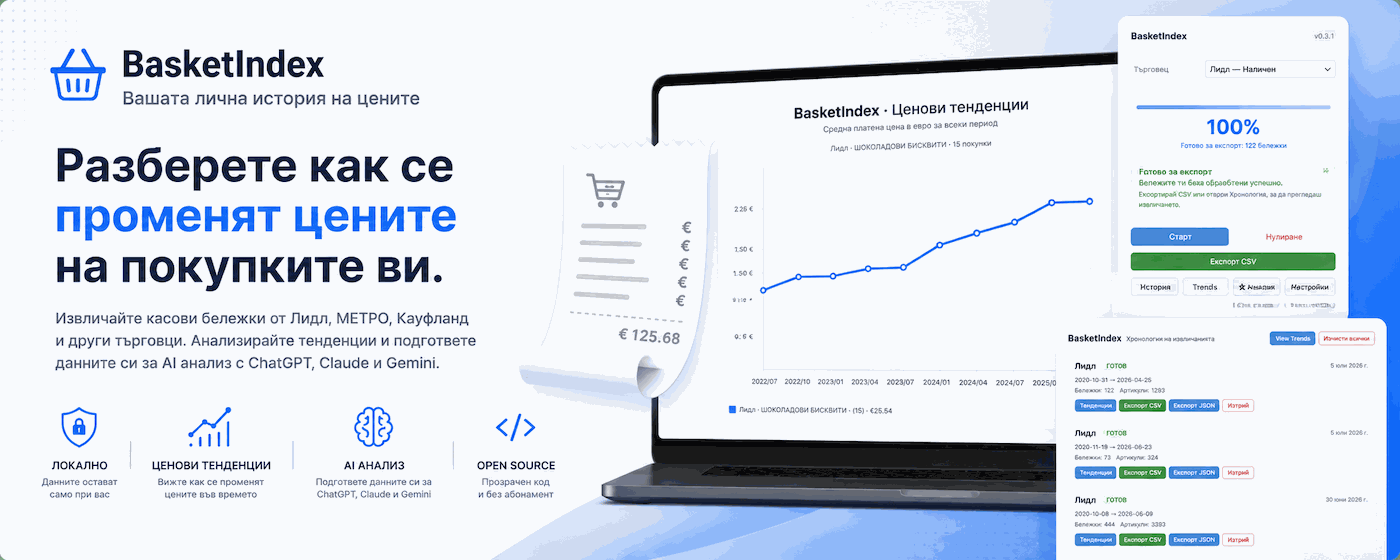
Виж как се променят цените във времето за продуктите, които реално купуваш. Сравнявай продукти, филтрирай по период и проследи всяка точка до реална бележка.
See how prices change over time for the products you actually buy. Compare products, explore date ranges, and trace every point to a real receipt.
Локално
Local-first
Всички данни остават в браузъра ти. Никой сървър не вижда бележките ти. Експортирай CSV или JSON, когато решиш.
All data stays in your browser. No server ever sees your receipts. Export CSV or JSON when you choose.
Отворен код
Open source
Всеки ред код е публичен. Нула външни зависимости. Провери го сам. Без скрита телеметрия, без тъмни практики.
Every line of code is public. Zero runtime dependencies. Audit it yourself. No hidden telemetry, no dark patterns.
Как работи
How it works
Инсталирай
Install
Изтегли ZIP-а, разархивирай и зареди като разширение в Chrome.
Download the ZIP, unzip, and load as an unpacked extension in Chrome.
Извлечи
Extract
Избери Lidl или Metro, конфигурирай и стартирай. Ползва съществуващия ти вход - без пароли.
Choose Lidl or Metro, configure your extraction, and start. Uses your existing login - no passwords.
Прегледай
Review
Отвори Хронология, за да видиш всички извличания. Стартирай последващи, за да добавиш нови бележки без дубликати.
Open History to see all your extraction runs. Start follow-up runs to add newer receipts without duplicates.
Проследи
Track trends
Наблюдавай промените в цените за най-купуваните си продукти. Сравнявай през продукти, периоди и извличания.
Watch price changes over time for your most-bought products. Compare across products, date ranges, and extractions.
Експортирай
Export
Изтегли CSV или JSON. Експортирай аналитични графики и social карти. Твоите данни, твоите инструменти.
Download CSV or JSON. Export analysis charts and social share cards. Your data, your tools.
Как работи BasketIndex
How BasketIndex works
BasketIndex ти помага да извлечеш историята на покупките си, да я запазиш локално и да проследиш как се променят цените във времето. Процесът е кратък, но е добре да знаеш какво виждаш на всяка стъпка.
BasketIndex helps you extract your purchase history, keep it locally, and understand how prices change over time. The flow is short, but it helps to know what each screen is for.
1 Избери търговец и стартирай от изскачащия прозорецChoose a retailer and start from the popup
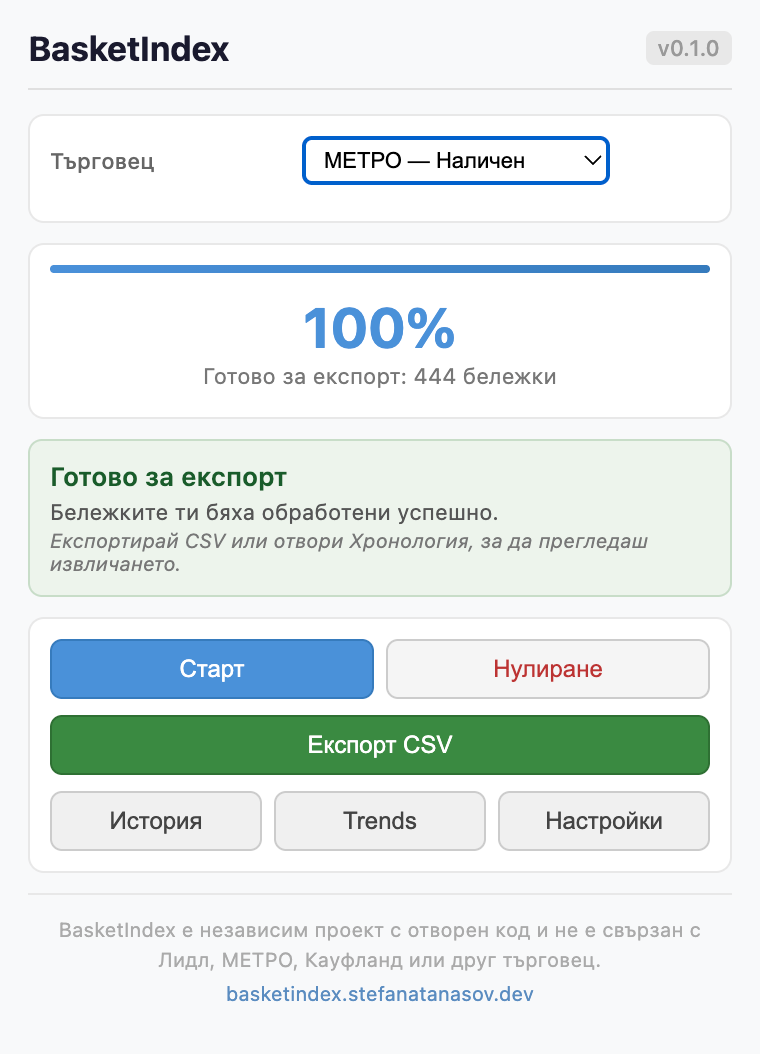
Когато отвориш разширението, първо избираш търговец. В основния екран виждаш текущото състояние на извличането, броя обработени бележки и най-важните действия: Старт, Нулиране, Експорт CSV, История, Trends, Настройки.
When you open the extension, the first step is choosing a retailer. The main popup shows the current extraction state, the number of processed receipts, and the key actions: Start, Reset, Export CSV, History, Trends, Settings.
Какво правиш: Избираш търговец и натискаш „Старт“, когато си готов.
What you do: Select a retailer and click "Start" when ready to begin.
Какво следва: BasketIndex използва активната ти сесия при търговеца и преминава към събиране и обработка на бележките.
What happens next: BasketIndex uses your active retailer session and starts collecting and processing your receipts.
Данните не минават през акаунт на BasketIndex. Инструментът работи локално в браузъра ти.
Your data does not go through a BasketIndex account. The tool works locally in your browser.
2 При нужда отвори настройкитеOpen settings if you need more control
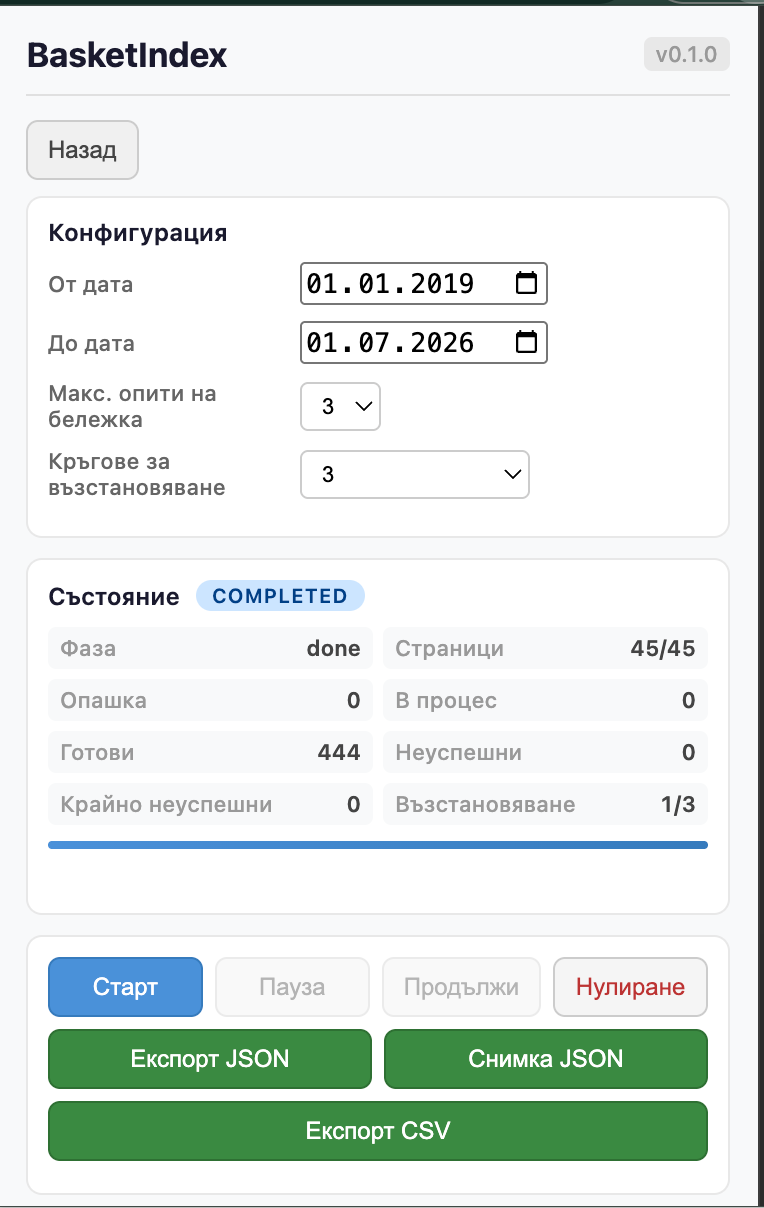
Екранът „Настройки“ ти дава повече контрол върху извличането. Тук можеш да зададеш период, брой опити при грешка и кръгове за възстановяване. Виждаш и по-подробно състояние: фаза, страници, опашка, в процес, готови, неуспешни, възстановяване.
The Settings screen gives you more control over the extraction. Here you can adjust the date range, retry behavior, and recovery rounds. You also get a more detailed job status view: phase, pages, queue, in flight, complete, failed, recovery.
Какво правиш: По желание настройваш периода и поведението на извличането.
What you do: Optionally refine the extraction range and reliability settings.
Какво следва: След като запазиш или оставиш настройките както са, връщаш се към стартиране и изчакваш обработката да приключи.
What happens next: Once you are happy with the setup, you return to the main flow and let the extraction finish.
За повечето потребители това е опционална стъпка. Основният поток може да започне и без допълнителни настройки.
For most users, this is optional. The default flow works without touching advanced settings.
3 Влизането става при самия търговецSign-in happens on the retailer side
Ако нямаш активна сесия, BasketIndex може да отвори страницата на избрания търговец, за да влезеш в профила си. Това не е екран на BasketIndex, а собствената страница за вход на търговеца.
If you do not have an active session, BasketIndex may open the selected retailer's page so you can sign in. This is not a BasketIndex-owned screen. It is the retailer's own authentication page.
Какво правиш: Влизаш по нормалния начин в профила си при съответния търговец.
What you do: Sign in normally using the retailer's own login flow.
Какво следва: След като имаш активна сесия, BasketIndex може да използва наличния достъп, за да прочете историята на покупките ти.
What happens next: Once your session is active, BasketIndex can use that existing access to read your purchase history.
Точният вид на този екран зависи от търговеца и от това дали вече си влязъл, затова тук няма фиксирана екранна снимка.
The exact appearance of this step depends on the retailer and on whether the user is already signed in, which is why there is no fixed screenshot for it.
4 След успешна обработка данните са готовиOnce processing is complete, your data is ready
Когато извличането приключи успешно, основният екран показва, че бележките са готови за експорт. Виждаш прогреса, броя обработени бележки и кратко съобщение, че можеш да продължиш към CSV или към Хронология.
When the extraction finishes successfully, the main popup shows that your receipts are ready for export. You can see the completion state, the processed receipt count, and a clear prompt to continue with CSV export or open History.
Какво правиш: Ако искаш бърз резултат, можеш директно да изтеглиш CSV. Ако искаш да разгледаш запазените извличания, отвори „История“.
What you do: If you want a quick result, export CSV immediately. If you want to review stored runs, open History.
Какво следва: Оттук нататък можеш или да експортираш данните, или да ги разглеждаш по извличания и тенденции.
What happens next: From here, you either export the data or move deeper into run-by-run review and trend analysis.
5 Хронологията пази отделните извличания и експортитеHistory keeps your extraction runs and exports organized
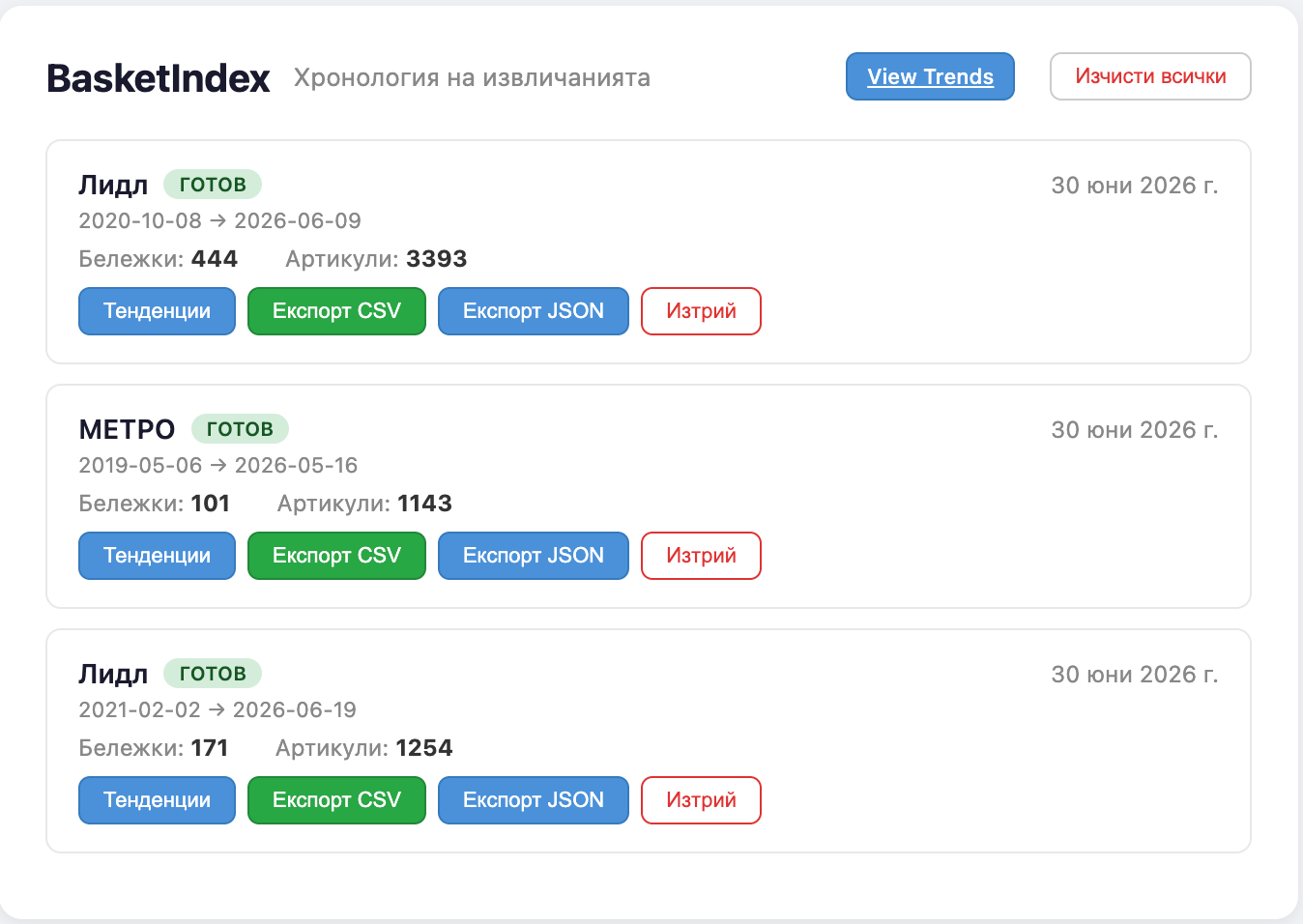
В страницата „Хронология на извличанията“ виждаш всяко запазено извличане като отделен запис. За всяко са показани: търговец, период на покритие, брой бележки, брой артикули, дата на извличане. Действия: Тенденции, Експорт CSV, Експорт JSON, Изтрий.
The History page shows each saved extraction as a separate run. Each card gives you: retailer, coverage period, receipt count, item count, extraction date. Actions: Trends, Export CSV, Export JSON, Delete.
Какво правиш: Преглеждаш старите извличания, избираш кое искаш да анализираш и при нужда експортираш суровите данни.
What you do: Review past runs, choose which one to analyze, and export raw data when needed.
Какво следва: Натискането на „Тенденции“ отваря анализа точно за това извличане, с предварително подбран обхват.
What happens next: Clicking "Trends" opens analysis for that run with a preselected scope.
Това е най-доброто място, ако искаш да се върнеш към по-старо извличане, вместо да започваш отначало.
This is the best place to revisit older extractions instead of starting over.
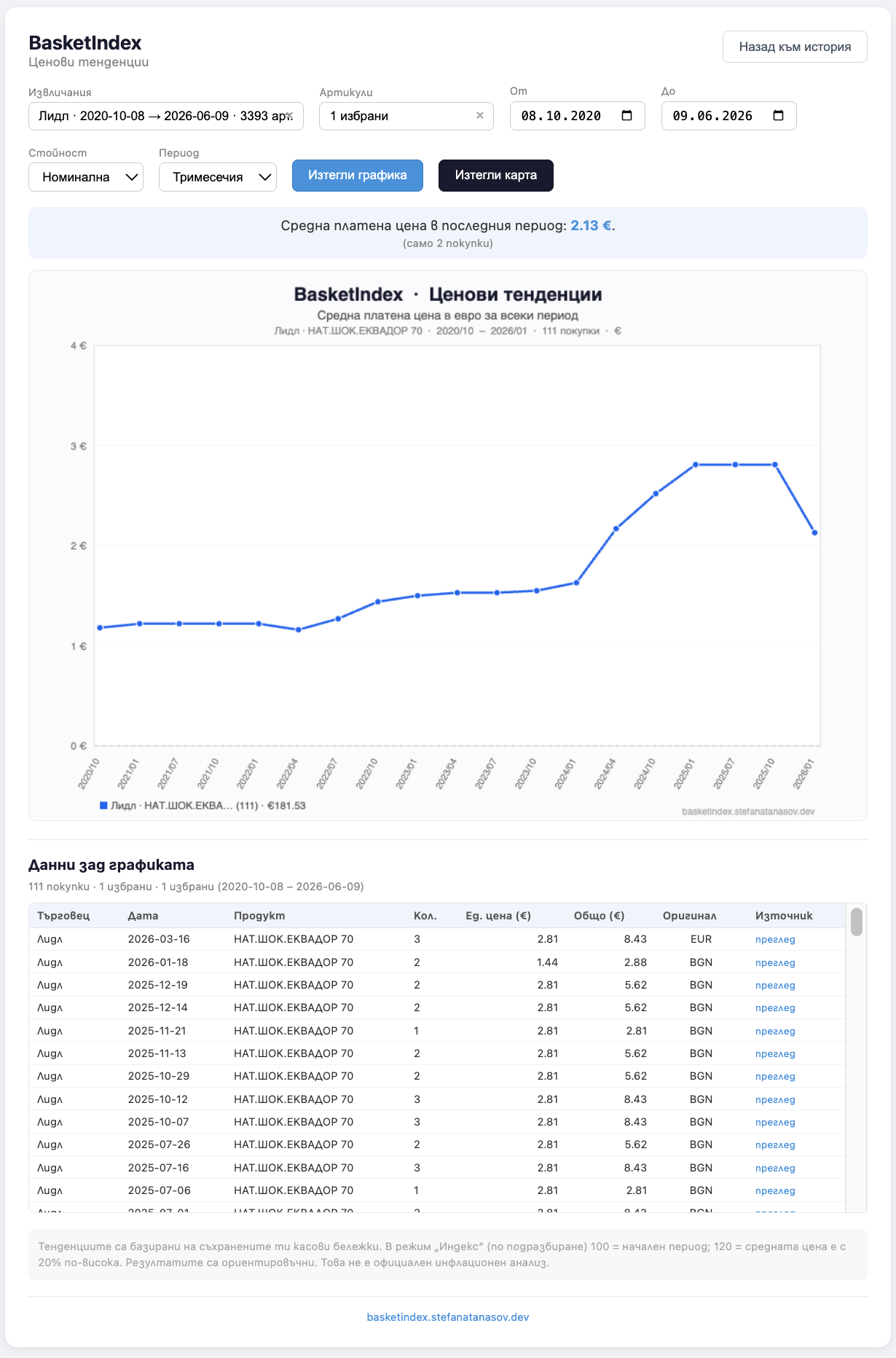
6 Тенденциите показват как се променят ценитеTrends help you understand how prices changed
Страницата „Ценови тенденции“ е аналитичният изглед на BasketIndex. Тук можеш да филтрираш по извличания, артикули, период от/до, тип стойност и честота на периода. Екранът показва обобщение, графика, таблица с данни зад графиката, източник и оригинална валута за проследимост, и бутони за изтегляне на графика и карта.
The Trends page is BasketIndex's analysis view. Here you can filter by extraction runs, products, date range, value type, and time aggregation. The screen includes a summary, a chart, the evidence table behind the chart, source links and original currency for traceability, and export actions for the chart and share card.
Какво правиш: Избираш извличане или продукт и разглеждаш как реално са се променяли платените цени във времето.
What you do: Choose a run or a product and inspect how paid prices changed over time.
Какво следва: Можеш да изтеглиш графиката, да провериш конкретните редове под нея и да използваш резултата за личен анализ.
What happens next: You can export the visual, inspect the underlying rows, and use the result for your own personal analysis.
Този екран не е статичен. Видимите продукти, диапазони и резултати зависят от това какво извличане и какви филтри са избрани.
This screen is not fixed. The products, ranges, and chart output depend on the currently selected extraction and filters.
BasketIndex не се опитва да бъде официален инфлационен индекс. Това е личен инструмент за разбиране на собствените ти покупки на база реални касови бележки.
BasketIndex is not trying to be an official inflation index. It is a personal price intelligence tool built on top of your real receipts.
Поверителност, наистина
Privacy, for real
BasketIndex е създаден с проста идея: ако може да работи без сървър, така трябва да бъде.
BasketIndex was built with a simple rule: if it can work without a server, it should.
Без сървър
No server
Няма бекенд. Разширението работи изцяло в браузъра ти. Няма какво да бъде хакнато, изтекло или призовано.
There is no backend. The extension runs entirely in your browser. We have nothing to hack, leak, or subpoena.
Без акаунти
No credentials
Никога не създаваш акаунт. Без вход. Без събиране на имейли. Разширението никога не пита кой си.
You never create an account. No login. No email collection. The extension never asks who you are.
Без анализи
No analytics
Нула проследяване. Без Google Analytics, без телеметрия, без сигнали за използване. Не можем да видим какво правиш с инструмента.
Zero tracking. No Google Analytics, no telemetry, no usage pings. We cannot see what you do with the tool.
Твоите данни, преносими
Your data, portable
Експортирай историята си като CSV или JSON по всяко време. Експортирай аналитични графики и social карти. Премести ги в друг инструмент. Изтрий ги. Те са твои.
Export your history as CSV or JSON anytime. Export analysis charts and social share cards. Take it to another tool. Delete it. It's yours.
Поддържани търговци
Current support
BasketIndex работи с два търговеца в момента:
BasketIndex works with two retailers today:
Lidl
DOM-базирано извличане от страниците с история на покупките и детайли на бележките. Тествано с Lidl България.
DOM-based extraction from purchase history and receipt detail pages. Tested on Lidl Bulgaria.
Metro
Токен-базирано API извличане от фактури и артикули. Работи с Metro България.
Token-based API extraction from invoices and articles. Works with Metro Bulgaria.
Архитектурата позволява добавяне на нови търговци като самостоятелни адаптерни модули. Kaufland е планиран.
The architecture supports adding new retailers as self-contained adapter modules. Kaufland is planned.
Твоите извличания на едно място
All your extracts in one place
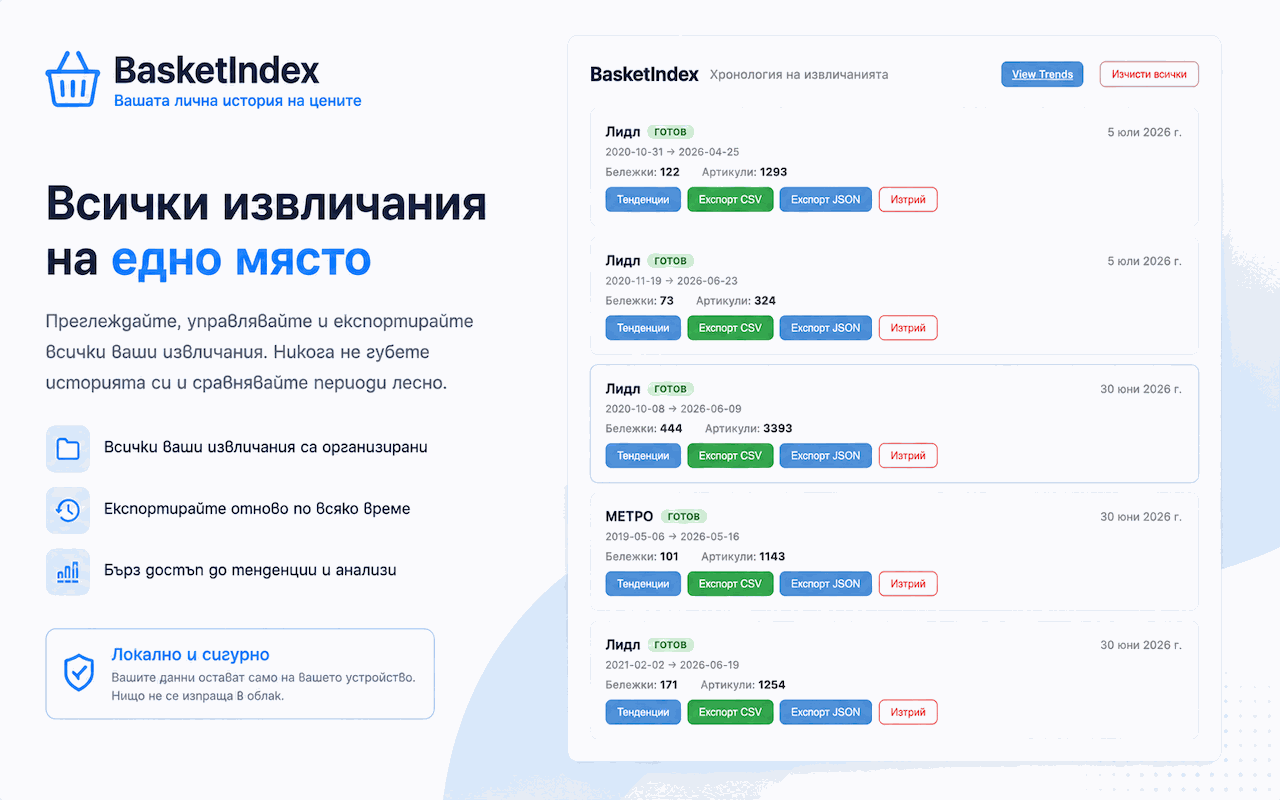
BasketIndex не е инструмент за еднократен експорт. Всяко извличане се запазва като самостоятелен запис с дата, обхват на покритие и брой бележки. Можеш да се връщаш към стари извличания, да ги експортираш отново и да преминаваш директно към анализ на тенденциите.
BasketIndex is not a one-time export tool. Each extraction is saved as a standalone record with date, coverage range, and receipt count. Revisit past runs, export them again, and jump directly into trend analysis.
AI анализ на твоите покупки
AI analysis of your purchases
BasketIndex ти помага да подготвиш данните си за анализ с изкуствен интелект — без самата програма да прави AI обработката. Ти избираш извличанията и типа анализ, а BasketIndex създава локален ZIP пакет с:
BasketIndex helps you prepare your data for AI analysis — without the extension itself doing any AI processing. You choose the extracts and analysis type, and BasketIndex creates a local ZIP pack containing:
- data.json — нормализирани бележки с предварително изчислени помощни обобщения (топ продукти, повтарящи се покупки, разходи по месеци, отстъпки, сравнение между търговци)
- data.json — normalized receipts with precomputed helper summaries (top products, recurring purchases, monthly spend, discounts, retailer comparison)
- prompt-bg.md и prompt-en.md — висококачествени инструкции за анализ на български и английски
- prompt-bg.md and prompt-en.md — high-quality analysis prompts in Bulgarian and English
- README.md — кратки инструкции как да използваш пакета
- README.md — short instructions on how to use the pack
Как работи: Избираш едно или повече извличания → избираш тип анализ (лична инфлация, спестявания от промоции, сравнение между търговци, основна кошница) → избираш език → BasketIndex генерира ZIP пакет локално в браузъра ти → качваш ZIP-а в избрания от теб AI модел (ChatGPT, Claude, Gemini и др.) и поставяш prompt-а.
How it works: Select one or more extracts → choose analysis type (personal inflation, discount savings, retailer comparison, core basket) → choose language → BasketIndex generates a ZIP pack locally in your browser → upload the ZIP to your AI model of choice (ChatGPT, Claude, Gemini, etc.) and paste the prompt.
Важно: BasketIndex НЕ извършва AI анализ. Той само подготвя и пакетира данните ти. Ти решаваш кой AI модел да използваш и как да интерпретираш резултатите. Цялата обработка е локална — никакви данни не се изпращат към сървър.
Important: BasketIndex does NOT perform AI analysis. It only prepares and packages your data. You choose which AI model to use and how to interpret the results. All processing is local — no data is sent to any server.
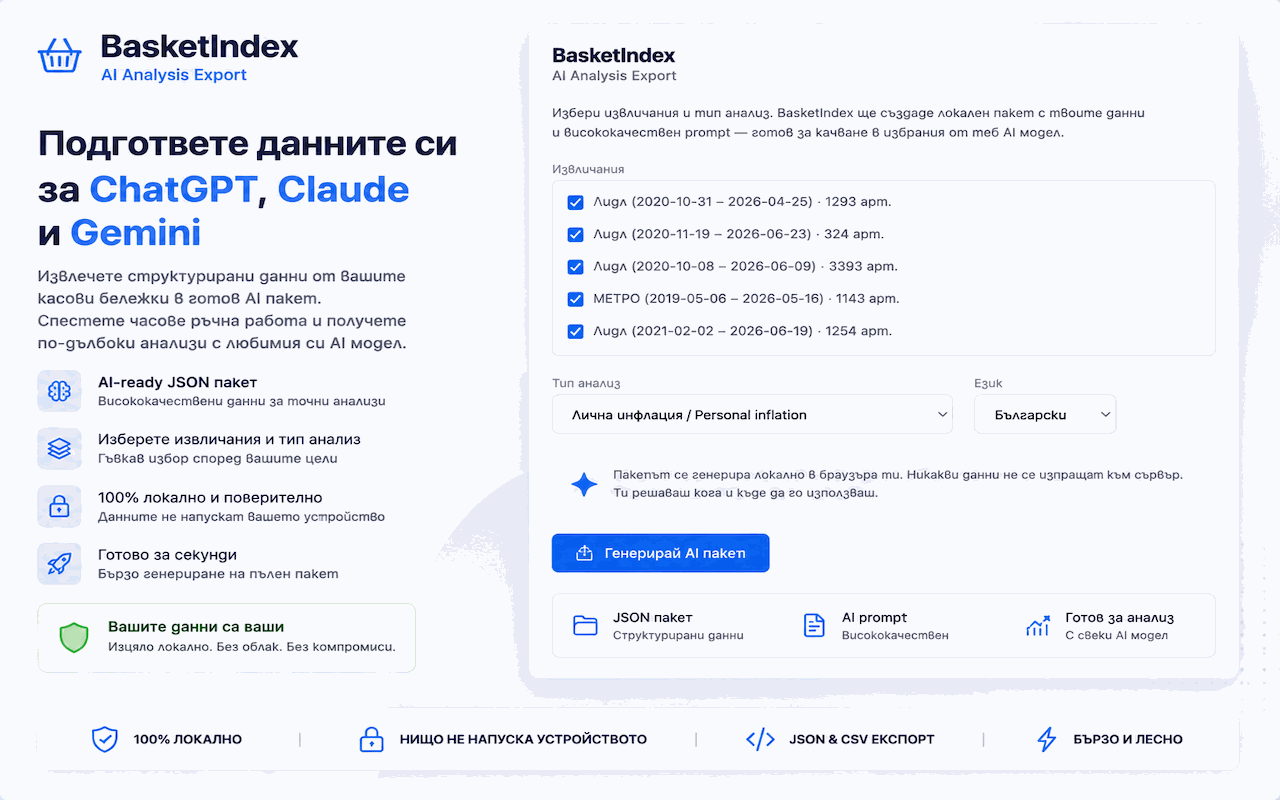
Готов за AI анализ
Ready for AI analysis
Избери извличания и тип анализ. BasketIndex създава локален ZIP с твоите данни, предварително изчислени обобщения и висококачествени prompts. Качи пакета в ChatGPT, Claude или Gemini — без данните ти да напускат браузъра, докато не решиш.
Choose extracts and analysis type. BasketIndex creates a local ZIP with your data, precomputed summaries, and high-quality prompts. Upload the pack to ChatGPT, Claude, or Gemini — without your data ever leaving your browser until you decide.
Разбери цените си
Understand your prices
Страницата Тенденции на BasketIndex показва как се променят цените на най-купуваните ти продукти във времето. Сравнявай продукти един до друг, филтрирай по период и виж данните зад всяка точка в доказателствената таблица.
BasketIndex's Trends page shows how the prices of your most-bought products change over time. Compare products side by side, filter by date range, and see the data behind every chart point in the evidence table.
Три режима на визуализация ти помагат да разбереш разходите си:
Three viewing modes help you understand your spending:
- Номинална (€) - реална средна цена за периода в евро
- Nominal (€) - actual average price per period in euros
- Индекс - спрямо началото на избрания период (100 = начало)
- Index - relative to the start of your selected date range (100 = beginning)
- Проценти - колко по-висока или по-ниска е цената спрямо началото
- Percentage - how much higher or lower prices are compared to the start
За по-задълбочен анализ експортирай данните си и използвай избран от теб инструмент - ChatGPT, Claude, електронна таблица или собствени скриптове. Предоставяме шаблон с инструкции за AI анализ.
For deeper analysis, export your data and use any tool you choose - ChatGPT, Claude, a spreadsheet, or your own scripts. We provide a downloadable prompt template to get you started with AI analysis.
Важно: BasketIndex не включва изкуствен интелект. Не изчислява официална инфлация. Не дава финансови съвети. Страницата Тенденции показва ценови промени на база реално платени цени. Шаблонът с инструкции е само отправна точка.
Important: BasketIndex does not include AI. It does not calculate official inflation. It does not give financial advice. The Trends page shows price changes based on your actual paid prices. The downloadable prompt is just a template.
Виж какво се случва с цените ти
See what's happening to your prices
Множество продуктови линии върху една графика. Филтрирай по период, избери конкретни извличания и продукти, задръж върху точка за детайли. Всяка стойност е проследима до реална касова бележка.
Multiple product lines on one chart. Filter by date range, pick specific extracts and products, hover for details. Every value is traceable to a real receipt.
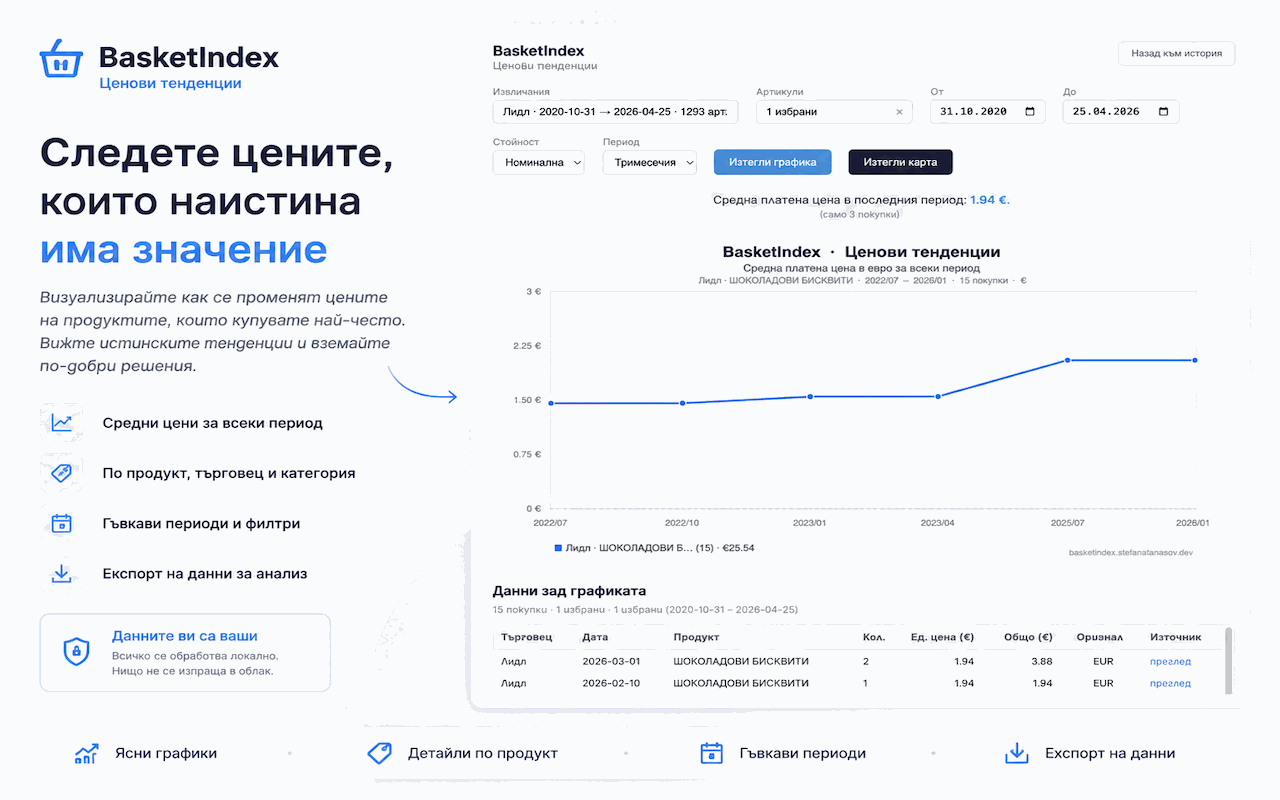
Колко всъщност поскъпнаха вашите покупки?
How much did your shopping really go up?
Не разчитайте на общи заглавия. Проверете с реалните си касови бележки кои продукти са се променили най-много и как се е изменил вашият личен разход във времето. BasketIndex превръща неясното усещане в конкретни числа.
Don't rely on generic headlines. Check against your real receipts which products changed most and how your personal spending evolved over time. BasketIndex turns vague concern into concrete numbers.
Зрялост на продукта
Release maturity
BasketIndex е в Стабилна бета от юли 2026. Това означава:
BasketIndex is in Stable Beta as of July 2026. This means:
- Основното извличане работи надеждно за Lidl и Metro
- Core extraction works reliably for Lidl and Metro
- Всички основни функции са внедрени: извличане, хронология, тенденции, експорт
- All major features are implemented: extraction, history, trends, exports
- Последващи извличания за обновяване с нови бележки без дубликати
- Follow-up runs let you refresh with newer receipts without duplicates
- Кодът е тестван, документиран и с отворен код
- The code is tested, documented, and open source
- Ръчната инсталация работи веднага (изтегли ZIP, зареди разширение)
- Manual installation works today (download ZIP, load unpacked)
Публикуването в Chrome Web Store се очаква. Можеш да го инсталираш ръчно още сега.
The Chrome Web Store listing is currently pending review. You can install it manually right now.
Отворен код
Open source
BasketIndex е напълно с отворен код под MIT лиценз. Целият код е наличен в GitHub.
BasketIndex is fully open source under the MIT license. The entire codebase is available on GitHub.
Ръчната инсталация е възможна веднага - клонирай хранилището, зареди разширението в режим за разработчици в Chrome и си готов. Без да чакаш одобрение в магазина.
Manual installation is possible right now - clone the repo, load the unpacked extension in Chrome's developer mode, and you're running. No waiting for store approval.
История на продукта
Product timeline
Публикувано в Chrome Web Store
Published on Chrome Web Store
BasketIndex вече е наличен в Chrome Web Store. Директна инсталация с един клик от официалната страница на разширението. При потребители с Enhanced Safe Browsing Chrome може временно да показва предупреждение — това е нормално за по-нови разширения.
BasketIndex is now available on the Chrome Web Store. One-click install from the official extension page. Users with Enhanced Safe Browsing may temporarily see a warning — this is expected for newer extensions.
v0.3.0 · AI Analysis Export Pack · Отстъпки по артикули
v0.3.0 · AI Analysis Export Pack · Item-level discounts
AI пакет за анализ: нова страница в разширението за генериране на локален ZIP пакет с данни и висококачествени prompts за анализ с изкуствен интелект. Потребителят избира извличания и тип анализ; BasketIndex пакетира данните локално. Четири типа анализ: лична инфлация, спестявания от промоции, сравнение между търговци, основна кошница. Отстъпки по артикули: Lidl вече приписва редове с отстъпки към съответните продукти чрез анализ на позицията в касовата бележка. Подобрен CSV експорт с колони за отстъпки по артикул.
AI Analysis Export Pack: new extension page for generating local ZIP packs with data and high-quality AI analysis prompts. User selects extracts and analysis type; BasketIndex packages data locally. Four analysis types: personal inflation, discount savings, retailer comparison, core basket. Item-level discounts: Lidl now attributes discount rows to the correct products via receipt-position analysis. Improved CSV export with per-item discount columns.
v0.2.0 · Стабилна бета · Публична страница и landing
v0.2.0 · Stable Beta · Landing + public launch
Двуезична лендинг страница (BG/EN) с онбординг, реални екранни снимки, GA4 анализи и секция с продуктовия път. Котвени връзки към всички секции. Подобрени експорти: аналитична графика и social карта за споделяне. Директна дистрибуция на ZIP от GitHub Releases. ЕUR-консистентен номинален режим, подобрено разстояние в графиката.
Bilingual landing page (BG/EN) with onboarding, real screenshots, GA4 analytics, and product timeline. Section anchor links throughout. Improved exports: analysis chart and social share card. Direct ZIP distribution from GitHub Releases. EUR-consistent nominal mode, improved chart spacing.
Тенденции и хронология · Основен анализ
Trends & History · Core analysis
Страница „Ценови тенденции“: множество продуктови серии, три режима (номинален €, индекс, проценти), филтриране по период, интерактивни tooltip-ове, таблица с доказателства, чистене на шум в заглавията. История: последващи извличания, дедупликация на бележки, обратна връзка за нула нови бележки, опростени карти. Номинален режим с единна валута (EUR с BGN→EUR конвертиране).
Trends page: multi-series charts, three modes (nominal €, index, percentage), date range filtering, interactive tooltips, evidence table, title noise cleanup. History: follow-up extraction, receipt deduplication, zero-new-receipts feedback, simplified cards. Nominal mode with unified currency (EUR with BGN→EUR conversion).
METRO адаптер · Втори търговец
Metro adapter · Second retailer
API-базирано извличане от Metro България: фактури и артикули през токен-базиран достъп. Преработен Lidl адаптер към API-first архитектура със споделени скриптове. Подобрени CSV/JSON експорти с експлицитни EUR/BGN колони.
API-based extraction from Metro Bulgaria: invoices and articles via token-based access. Refactored Lidl adapter to API-first architecture with shared scripts. Improved CSV/JSON exports with explicit EUR/BGN columns.
Локализация и UX · Български интерфейс
Localization & UX · Bulgarian interface
Пълен български превод на интерфейса. Хронология на извличанията с неизменяеми записи. Подобрен изскачащ прозорец с прост и разширен изглед. Панел с обратна връзка за потребителя и съобщения за грешки. Полски визуален дизайн.
Full Bulgarian translation. Extraction history with immutable records. Improved popup with simple and advanced views. User feedback panel with error messages. Polished visual design.
v0.1.0 · Първа версия · Lidl експорт на бележки
v0.1.0 · Initial release · Lidl receipt export
Първоначална работеща версия: Lidl адаптер за извличане на касови бележки, JSON и CSV експорт, локално съхранение, нула сървъри, нула анализи, нула телеметрия. Публикувано на GitHub с MIT лиценз.
First working version: Lidl receipt extraction adapter, JSON and CSV export, local storage, zero servers, zero analytics, zero telemetry. Published on GitHub under MIT license.
FAQ #
Кои търговци се поддържат?
Which retailers are supported?
Lidl и Metro. Kaufland е планиран. Адаптерната архитектура прави добавянето на нови търговци лесно.
Lidl and Metro. Kaufland is planned. The adapter architecture makes adding new retailers straightforward.
Къде се съхраняват данните ми?
Where is my data stored?
Изцяло в локалното хранилище на браузъра ти. BasketIndex използва Chrome Storage API. Нищо не се изпраща никъде.
Entirely in your browser's local storage. BasketIndex uses the Chrome Storage API. Nothing is sent anywhere.
Мога ли да експортирам данните си?
Can I export my data?
Да - вграден е експорт в CSV и JSON. Можеш също да експортираш аналитични графики и social карти от страницата Тенденции.
Yes - CSV and JSON export are built in. You can also export analysis charts and social share cards from the Trends page.
Свързан ли е проектът с Lidl или Metro?
Is this affiliated with Lidl or Metro?
Не. BasketIndex е независим проект с отворен код. Не е свързан, спонсориран или подкрепян от никой търговец.
No. BasketIndex is an independent open-source project. It is not affiliated with, endorsed by, or connected to any retailer.
Включва ли BasketIndex изкуствен интелект или изчислява инфлация?
Does BasketIndex include AI or calculate inflation?
Не. BasketIndex експортира данните от бележките ти в структуриран формат и показва ценови тенденции на база реално платени цени. Не изчислява официална инфлация и не включва AI функции. Ти избираш как да анализираш данните си.
No. BasketIndex exports your receipt data in a structured format and shows price trends based on your actual paid prices. It does not calculate official inflation or include AI features. You choose how to analyze your data.
Как да го инсталирам?
How do I install it?
Изтегли basketindex-extension.zip, разархивирай го, отвори chrome://extensions, включи режим за разработчици, натисни Зареди разширение и избери разархивираната папка. Или инсталирай директно от Chrome Web Store.
Download the basketindex-extension.zip, unzip it, open chrome://extensions, enable Developer Mode, click Load unpacked, and select the unzipped folder. Or install directly from the Chrome Web Store.
Защо Chrome ми показва предупреждение при инсталиране?
Why does Chrome show a warning during installation?
Ако използвате Enhanced Safe Browsing, Chrome може временно да покаже предупреждение за по-нови разширения. Това не означава, че BasketIndex е счупен или непубликуван. Ако сте отворили разширението от официалната му страница в Chrome Web Store, можете да продължите чрез Continue to install.
If you use Enhanced Safe Browsing, Chrome may temporarily show a warning for newer extensions. This does not mean BasketIndex is broken or unpublished. If you opened the extension from its official Chrome Web Store page, you can still continue via Continue to install.
Работи ли на Firefox или други браузъри?
Does this work on Firefox or other browsers?
Засега само Chrome. Поддръжка за други браузъри е планирана.
Currently Chrome only. Cross-browser support is on the roadmap.